Smartphone Camera Add-On Lenses: 5 Myths Busted for Modern Creators
Software can simulate a professional look, but only physical glass captures a soul. You’ve likely felt the frustration of grainy digital zooms or that “uncanny valley” feeling of fake, software-driven bokeh. While phone manufacturers promise professional results through AI, the truth is that computational photography has hit a ceiling. High-quality smartphone camera add on lenses are the only way to bypass these digital limitations and achieve true optical excellence. You don’t need a bulky DSLR to produce world-class visuals; you just need the right glass.
We know you’re ready to stop settling for “good enough” mobile shots. You want cinematic flares, razor-sharp details, and wide-screen aspect ratios that stop the scroll. We agree that your creative vision deserves better than blurry edges and flat, digital colors. This article promises to show you exactly why physical optics still outperform even the smartest algorithms. You’ll learn how to choose the right tools to elevate your production to professional standards. We are busting five common myths about mobile glass and revealing how tools like anamorphic and macro lenses can transform your social media engagement.
Key Takeaways
- Understand why physical optics outperform digital cropping to maintain professional image resolution and clarity.
- Learn how premium smartphone camera add on lenses eliminate chromatic aberration and distortion compared to budget plastic alternatives.
- Discover why cinematic anamorphic flares and extreme macro details require real glass rather than software simulations.
- Master fast, precision mounting systems to ensure perfect lens alignment and maximum edge-to-edge sharpness.
- Realize why a mobile-first setup often outperforms a bulky DSLR for social media engagement and rapid content creation.
Myth 1: ‘My Phone’s Built-in Lenses Are Pro-Level Already’
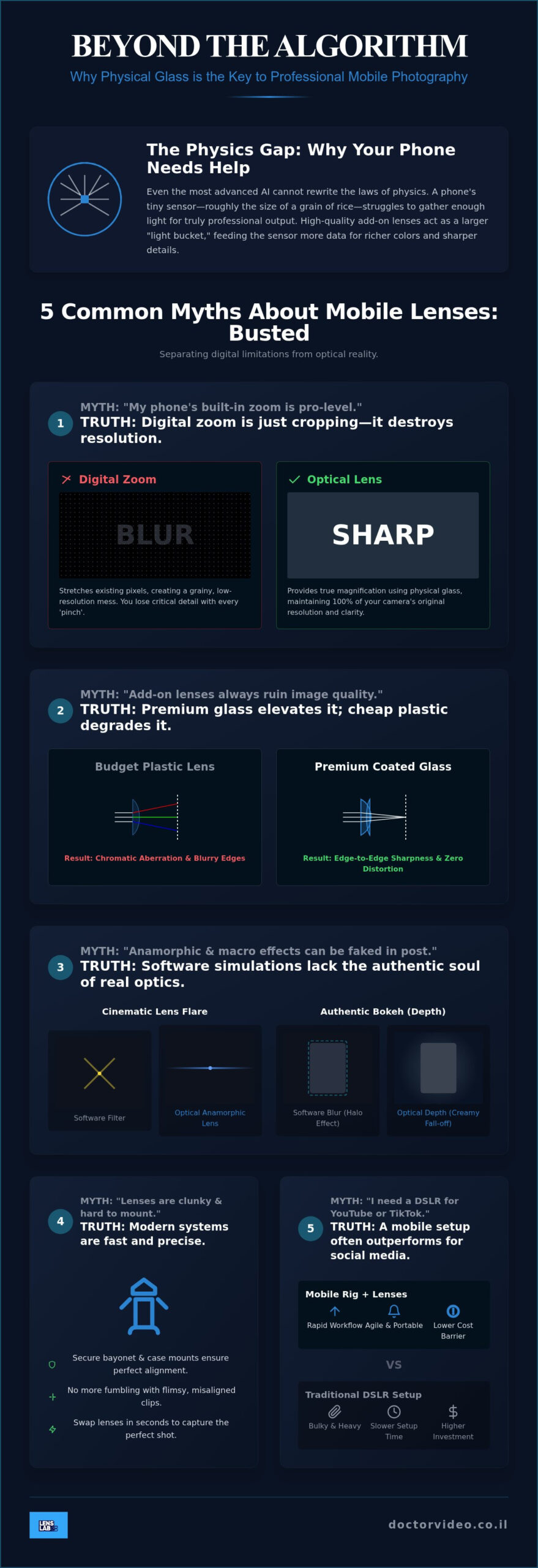
Modern smartphones are engineering marvels. They pack incredible processing power into your pocket. However, even the most advanced AI cannot rewrite the laws of physics. The “Physics Gap” is the massive divide between a tiny mobile sensor and the high-quality glass found in professional optics. Your phone sensor is roughly the size of a grain of rice. It struggles to gather enough light and detail for truly professional output. This is where smartphone camera add on lenses become your most valuable creative partner. They provide a larger physical surface to capture light before it reaches the sensor. Physics doesn’t lie. More light means more life in your shots.
Think about your phone’s zoom. Most creators rely on digital zoom, but this is a trap. Digital zoom is just cropping. It stretches existing pixels and destroys image resolution. Your sharp 12MP shot quickly becomes a grainy, muddy mess. Physical optics allow for true optical magnification. You keep every pixel. You maintain every detail. By adding professional glass, you gather more data and light. This results in richer colors and better performance in challenging environments. Professional results require professional tools. Don’t let a software crop ruin your best work.
Computational vs. Optical Photography
Computational photography is a software “guess” at reality. Your phone uses algorithms to decide where blur should go or how colors should look. It’s often impressive, but it lacks the soul of real glass. Software bokeh usually has “halo” artifacts around hair or edges. It looks artificial. Physical optics create authentic optical fall-off. This is the natural, creamy transition from your sharp subject to a soft background. Using smartphone camera add on lenses gives you a cleaner RAW file. You get a foundation of real data instead of a software-processed approximation. This makes your post-production editing much more effective and professional.
The Limitations of Native Focal Lengths
Your phone’s default lens is often too wide for portraits and too narrow for epic landscapes. Native “Wide” lenses frequently distort faces, making noses look larger or foreheads look stretched. It’s a compromise built for general use, not professional artistry. Using a dedicated 16mm Wide Angle Lens for Smartphones allows you to capture expansive architecture or tight interior shots without that distracting “fish-eye” warping. For outdoor creators who want to push beyond these native limitations, a dedicated smartphone lens for landscape photography can deliver edge-to-edge sharpness and true optical clarity across sweeping natural vistas. In the context of mobile sensors, focal length is the distance between the lens and the sensor that determines your field of view. Changing this physically, rather than digitally, is the secret to professional-grade composition.
- Better Light: Physical glass captures more photons than a tiny native aperture.
- True Depth: Optical fall-off beats software blur every single time.
- Zero Loss: Avoid the resolution-killing trap of digital cropping and zoom.
Myth 2: ‘Add-On Lenses Always Ruin Image Quality’
Many creators have been burned by cheap, plastic optics. If you’ve ever clipped a ten-dollar lens to your phone and seen blurry edges, you might think the whole category is a gimmick. That’s a mistake. The quality of your output is directly tied to the quality of your glass. Premium smartphone camera add on lenses are precision-engineered tools. They use high-index glass to ensure that light reaches your sensor without distortion. Quality doesn’t just happen; it’s manufactured.
Chromatic aberration is the enemy of professional photography. This is the purple or green “fringing” that appears around bright objects in high-contrast scenes. It happens when a lens fails to focus all colors of light onto the same point. High-end optics use multi-coated elements to fix this. They deliver edge-to-edge sharpness that makes your mobile shots indistinguishable from a traditional camera. When your glass is clear, your vision is clear. Contrast and color accuracy rely on how well that glass manages light.
Spotting High-Quality Glass
How do you tell the difference between a toy and a tool? Start with the weight. Real glass is heavy. A substantial lens usually indicates a multi-element design where several pieces of glass work together to correct distortion. Next, look at the surface under a light. High-quality lenses have a distinct purple or green sheen. This is the anti-reflective coating. It improves contrast and prevents “ghosting” when you’re shooting toward a light source. If the lens looks like plain, clear plastic, it’s likely a budget compromise.
The Truth About ‘Budget’ Kits
Cheap kits are often more trouble than they’re worth. They frequently cause vignetting, which creates dark, circular shadows in the corners of your frame. This ruins the professional aesthetic of your video. Even worse, poorly designed clips can actually scratch your phone’s native lens over time. You shouldn’t risk a flagship phone for a cheap piece of plastic. Professional gear is an investment in your brand. If you’re building a mobile studio, check out our Smartphone Vlogging Gear: Ultimate 2026 Creator’s Guide to see how premium glass fits into a complete workflow. Choosing the right smartphone camera add on lenses ensures your content remains sharp and ready for the big screen. You can find the best mobile optics to upgrade your kit today and start producing world-class visuals.
Myth 3: ‘Anamorphic and Macro Effects Can Be Done in Post’
Many creators believe cinematic looks are born in the editing room. They assume a simple crop or a digital filter can replicate the high-end feel of a Hollywood blockbuster. This is a common trap. While apps can add “letterbox” bars to your video, they can’t recreate the unique characteristics of optical glass. True cinematic style is about how light is captured, not how it’s manipulated later. High-quality smartphone camera add on lenses are essential for capturing these specific optical behaviors at the source. Physics wins every time.
The 1.55x Anamorphic Advantage
Anamorphic glass is the secret to that classic widescreen look. A 1.55x lens physically squeezes a wider field of view onto your phone’s sensor. When you de-squeeze this footage in post-production, you achieve a stunning 2.76:1 ultra-widescreen ratio. This process uses every single pixel on your sensor. If you simply crop a standard 16:9 video, you’re throwing away nearly 33% of your resolution. Don’t settle for less detail. Using the PRO 1.55X BLUE ANAMORPHIC LENS FOR SMARTPHONE also gives you authentic blue flares. These aren’t fake stickers. They are organic reactions to light sources in your scene. They move, stretch, and react as you move your camera. Digital flares look static and artificial because they don’t understand the light in your environment. Real glass does.
Macro: Seeing the Invisible
Your phone has a physical limit on how close it can focus. Most native lenses give up around 8 to 10 centimeters away. If you want to capture the intricate texture of a leaf or the details of a watch dial, you need help. A 10X Macro Lens for Smartphones allows you to focus just 1 centimeter away from your subject. This creates a magnification that software simply cannot fake. It also produces a razor-thin depth of field. This shallow focus separates your subject from the background with a creamy, professional blur. To get the best results, watch your lighting. Since you’re so close, your phone often casts a shadow. Use side-lighting to reveal textures and keep your smartphone camera add on lenses performing at their peak.
Optical glass also provides “compression” that software struggles to mimic. When you use a telephoto add-on, it pulls the background closer to your subject. This makes portraits look high-end and intentional. It’s a look that defines professional photography. You can’t achieve this by just walking closer or digital zooming. It requires the right glass to bend the light correctly. Stop trying to “fix it in post” and start capturing the magic live. Upgrade your storytelling with professional optics and see the difference in your next project.
Myth 4: ‘External Lenses Are Too Clunky and Hard to Mount’
The days of fumbling with flimsy plastic clips are over. Early iterations of mobile glass were often frustrating to use. They slipped, blocked the screen, and felt like toys. Today, the mounting ecosystem has transformed into a professional-grade setup. Modern smartphone camera add on lenses are designed for speed and precision. You don’t need to be a technician to get a perfect shot. You just need the right mounting system.
Alignment is the most critical factor in image sharpness. If your lens is off by even a millimeter, you lose edge-to-edge clarity. You’ll see blurring on one side of your frame or distracting dark corners. Precision mounts solve this by locking the glass into the exact center of your phone’s native sensor. This isn’t just about convenience; it’s about protecting your image integrity. Professional creators demand repeatable results. Modern mounting systems deliver that consistency every time you pick up your phone.
Magnetic vs. Clip-On Systems
Universal clips still have a place in a creator’s bag. They offer broad compatibility across different phone models. They are great for quick swaps between an iPhone and an Android device. However, they can be slow to align. For creators who value efficiency, magnetic systems are the clear winner. The JJC Magnetic Lens Filter Mount Adapter for iPhone is a game-changer for mobile production. It snaps into place instantly. No more fumbling with screws or spring-loaded clips during a shoot. Magnetic mounts ensure your optical axis is perfectly aligned every single time. This speed allows you to stay in the creative flow without technical distractions.
Lens Care and Maintenance
Professional gear requires professional care. A single fingerprint on your glass can ruin a high-resolution shot. Oils from your skin scatter light and reduce contrast. This leads to hazy, washed-out footage that looks amateur. Don’t use your t-shirt to clean your optics. This can lead to micro-scratches that permanently damage the multi-coating on your glass. Use a dedicated Lens Cleaning Spray and a fresh microfiber cloth for every shoot.
Keep your gear in a dedicated case when not in use. Proper maintenance ensures your investment lasts for years of content creation. The same rules apply across all your creative tools. Check out our guide on GoPro HERO 12 ND Filters to see how filter maintenance applies to your entire gear kit. Ready to streamline your workflow? You can explore our precision mounting systems and upgrade your mobile rig today. Stop fighting your gear and start creating with confidence.
Myth 5: ‘I Need a DSLR to Start a Successful YouTube or TikTok’
Stop waiting for the “perfect” camera to start your creative journey. Many aspiring influencers believe they need a $2,000 DSLR setup before they can hit record. This is a massive misconception that kills more channels than it helps. In reality, your smartphone is already more than capable of producing viral content. Social media algorithms often favor the authentic, high-energy feel of mobile-first video. When you combine that accessibility with professional smartphone camera add on lenses, the quality gap between you and the pros virtually disappears.
The best camera is the one you have with you. A bulky DSLR often stays in its bag because it’s too heavy to carry on a casual hike or a trip to the city. Your phone is already in your pocket. By adding a small pouch of lenses to your daily carry, you’re always ready to capture cinematic moments. The cost-to-value ratio is also undeniable. You can invest roughly $200 in a complete set of premium glass rather than dropping thousands on a traditional camera body and lenses. This leaves you with more resources to focus on what actually matters: your story and your community.
The Mobile Creator Workflow
Speed is the ultimate currency in the digital world. With a mobile setup, you can shoot, edit, and post all from the same device. You don’t have to worry about transferring huge files to a computer or dealing with complex color grading software. High-quality smartphone camera add on lenses give you that “pro look” instantly at the optical level. This streamlined workflow allows you to stay consistent and react to trends in real-time. Professional mobile lenses bridge the gap for budget-conscious influencers by providing elite visual depth without the heavy bag or the steep learning curve.
Building Your Starter Bundle
You don’t need every tool at once. Start by building a “Pro Mobile Kit” one piece at a time based on your niche. If you’re a vlogger or travel creator, a 16mm Wide Angle Lens for Smartphones is your best first investment. It captures more of the scene and makes handheld shots look much steadier. If you focus on product reviews or nature, a 10x Macro Lens for Smartphones will transform your feed with incredible detail. Also, consider adding a 4-Pack ND Filter Set if you shoot action or work in bright sunlight. These tools allow you to control light and motion blur like a seasoned cinematographer. If you’re an outdoor or travel creator, our dedicated guide to choosing the best smartphone lens for landscape photography covers the latest 2026 optical trends and essential filter setups to help you capture sweeping vistas with professional clarity. Success isn’t about having the most expensive gear; it’s about having the right tools for your vision. If you’re planning adventures on the road, our iPhone photography kit for travel checklist walks you through every essential piece of gear you need to shoot cinematic footage without the heavy bag.
Ready to take your content to the next level? You have the talent, now get the glass to match. Upgrade your mobile vision with LensLab’s pro lenses and start creating the professional-grade visuals your audience deserves today.
Ready to Transform Your Visual Storytelling?
You’ve seen the truth behind the myths. Professional results don’t require a heavy bag or a massive bank account. They require the right optics. High-quality smartphone camera add on lenses bridge the gap between amateur snapshots and cinematic masterpieces. By choosing premium multi-coated optical glass, you bypass the limitations of AI and capture the world with authentic depth and clarity. Physics beats software every time. You now understand that your mobile device is a powerhouse when paired with the right glass.
Stop letting gear limitations hold your vision back. We’re here to be your creative partner. We provide 24/7 creator support and fast worldwide shipping to over 20 countries. It’s time to own your influence and produce the content you’ve always imagined. Elevate your content with LensLab’s professional smartphone lenses and start your next project with confidence. Your audience is waiting for something extraordinary. Go out there and capture it.
Frequently Asked Questions
Do smartphone camera add on lenses work with all phone models?
Most lenses feature universal clip-on systems designed to fit almost any iPhone or Android device. These clips adjustable to clear your phone’s camera bump and align with the primary sensor. For creators seeking more stability, magnetic mounting systems provide a precision fit for specific models. Always check that the mount is compatible with your specific phone case to ensure a secure connection.
Will an external lens scratch my iPhone or Android camera?
High-quality optics won’t damage your phone if they use rubberized grips or padded contact points. Professional mounting systems prioritize the safety of your native glass. Avoid cheap, unpadded plastic clips that can apply uneven pressure or slip during use. Keeping both your phone and lens mounts free of dust prevents grit from causing micro-scratches during installation.
What is the difference between a 1.33x and 1.55x anamorphic lens?
The difference lies in the “squeeze” factor and the final widescreen aspect ratio. A 1.33x lens produces a classic 2.40:1 cinematic look, while a 1.55x lens creates an ultra-wide 2.76:1 ratio. The 1.55x version, like the PRO 1.55X BLUE ANAMORPHIC LENS, captures more horizontal data and utilizes more of your sensor’s resolution. This results in a more dramatic, professional aesthetic for your films.
Do I need a special app to use add-on lenses for my phone?
Standard optics like wide-angle or macro lenses work perfectly with your native camera app. You just clip them on and start creating. Anamorphic lenses are the exception because they require an app to “de-squeeze” the footage so it doesn’t look stretched. Many serious creators also use manual camera apps to gain full control over shutter speed and ISO for a true professional workflow.
How do I prevent blurry edges when using a clip-on wide-angle lens?
Perfect alignment is the only way to ensure edge-to-edge sharpness. If your lens is even slightly off-center from the phone’s native sensor, you’ll see blurring or “smearing” on the sides of your frame. Take a second to visually center the glass before you shoot. Premium smartphone camera add on lenses feature multi-element designs that naturally reduce this distortion compared to budget plastic alternatives.
Can I use external filters like ND or Star filters with these lenses?
Yes, you can easily stack professional filters using a dedicated adapter. Systems like the JJC Magnetic Lens Filter Mount allow you to snap on ND filters for cinematic motion blur or Star filters for creative light effects. This setup mirrors the workflow of a professional cinema camera. It gives you total control over light and exposure in any environment.
Is it better to buy a lens kit or individual lenses?
Kits offer the best value and versatility if you’re just starting your creative journey. They usually cover the essentials like wide-angle and macro photography in one package. If you have a specific niche, such as cinematic storytelling or product photography, investing in a high-end individual lens is often the better move. Build your collection based on the specific looks you want to achieve.
How do I clean my smartphone lenses without damaging the coating?
Use a dedicated Lens Cleaning Spray and a fresh microfiber cloth for every cleaning. Never use your t-shirt or paper towels, as these can trap abrasive particles or strip the delicate multi-coating from the glass. Lightly spray the cloth instead of the lens to prevent moisture from entering the housing. Regular maintenance ensures your smartphone camera add on lenses stay free of fingerprints and haze.