GoPro HERO 12 ND Filters: The Ultimate Guide to Cinematic Action (2026)
Imagine you’re shredding waves along the coast or conquering rugged mountain trails under a punishing midday sun. You hit record, but the resulting footage looks like a jittery, overexposed mess because you aren’t using GoPro HERO 12 ND filters. It’s a common frustration for creators who want that high-end look but find their highlights blown out and their motion looking “choppy.” You know that your camera is capable of more, yet the harsh light won’t cooperate.
Mastering these filters is the secret to unlocking professional results. They allow you to control the light, follow the 180-degree rule, and finally achieve that silky smooth motion blur you see in big-budget productions. This guide will show you exactly how to stop the glare and start creating cinematic art. We will break down which manual settings to use, which filter strengths to choose for every lighting condition, and how to maintain your gear so it survives the toughest outdoor elements.
Key Takeaways
- Eliminate “staccato” motion by using ND filters to lower your shutter speed in bright light.
- Apply the 180-degree rule to lock in cinematic motion blur that makes your action shots look professional.
- Select the perfect GoPro HERO 12 ND filters for every environment, from reflective water to intense desert sun.
- Secure your gear with a watertight installation and maintain crystal-clear optics using professional cleaning techniques.
- Simplify your workflow with a versatile 4-pack set designed to handle nearly any lighting condition you’ll face in the field.
Elevate Your Action: Why Your GoPro HERO 12 Needs ND Filters
Your camera is a powerhouse. It captures stunning 5.3K resolution and professional-grade color. But even the best sensor has a weakness: intense light. Think of a neutral-density filter as high-performance sunglasses for your lens. Without them, your camera is forced to compensate for the harsh Israeli sun by cranking up the shutter speed. This is where the trouble starts.
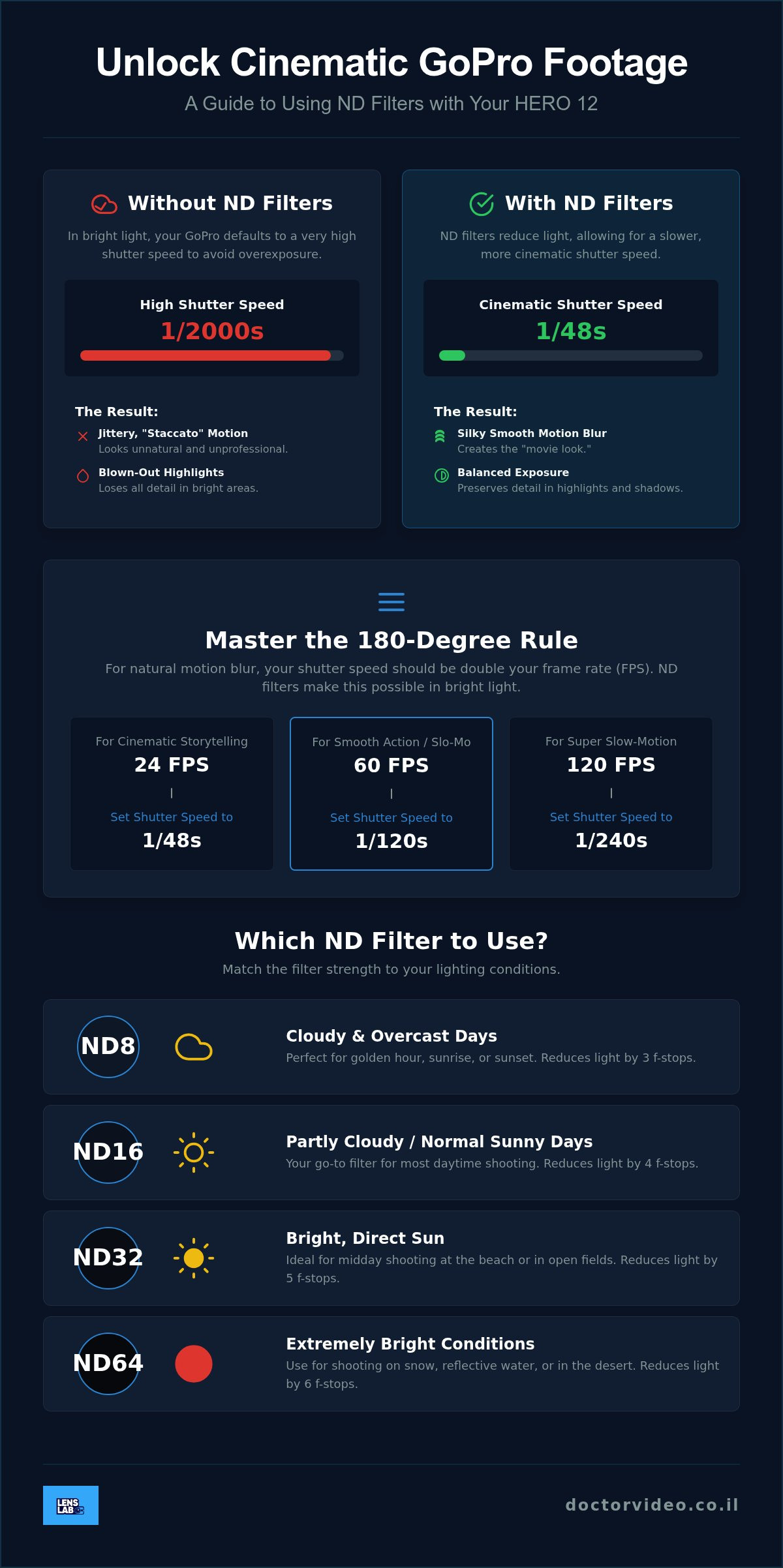
When your shutter speed hits 1/2000th of a second or higher, every single frame becomes a perfectly frozen moment. While that sounds like a good thing, it’s actually a disaster for video. It creates a “staccato” or “jittery” effect that feels unnatural to the human eye. This is the dreaded “plastic” look of cheap digital video. It lacks soul. It lacks flow. To fix this, you need GoPro HERO 12 ND filters to block out the excess light and force the camera into a slower, more cinematic shutter speed.
Cinematic motion blur is the gold standard of professional filmmaking. It’s that slight, dreamy smear on moving objects that makes a video feel high-end. It’s what separates a basic vlog from a professional production. By using an ND filter, you regain control over your settings, allowing you to capture the world exactly how you see it.
Natural Motion Blur vs. Digital Sharpness
Compare a shot at 1/2000 shutter speed to one at 1/120. At 1/2000, a spinning bike wheel looks like a collection of static spokes. It feels sharp but frozen. At 1/120, that same wheel has a beautiful blur that conveys speed and energy. The human eye expects this blur. If you wave your hand in front of your face right now, it isn’t perfectly sharp; it’s a blur. ND filters enable these lower shutter speeds without overexposing your shot, keeping your footage grounded in reality.
Maximizing the HERO 12 HDR and 10-Bit Color
The HERO 12 is a beast when it comes to dynamic range. Its 10-bit color and HDR capabilities allow for incredible detail in the highlights and shadows. However, if your highlights are “clipping” because the sun is too bright, that data is gone forever. No amount of editing can bring it back. Using GoPro HERO 12 ND filters keeps your exposure within a manageable range. This ensures the HDR processing has the best possible data to work with.
It also allows you to shoot in a flatter color profile without the image looking washed out. This gives you way more flexibility during color grading. You can push the blues of the Mediterranean or the reds of the Negev desert further because you’ve preserved the underlying data. It’s about giving your camera the environment it needs to perform at its peak.
Mastering the 180-Degree Rule for Cinematic Action
Professional filmmakers don’t just point and shoot. They follow a specific set of rules to ensure their footage feels “right” to the human eye. The most important of these is the 180-degree rule. This rule states that your shutter speed should always be double your frame rate. If you are shooting at 24 frames per second (fps), your shutter speed needs to be 1/48th of a second. This ratio creates the perfect balance of clarity and motion blur. It is the secret behind “The Movie Look” that makes Hollywood blockbusters feel so immersive.
Achieving this on a GoPro is a unique challenge. Most professional cameras have an adjustable aperture to control light. Your GoPro HERO 12 does not. It has a fixed aperture, meaning it is always “wide open.” In the bright Mediterranean sun, your camera will naturally try to use a shutter speed of 1/2000 or higher to prevent overexposure. This high speed destroys motion blur. Using GoPro HERO 12 ND filters is the only way to force the camera back to that cinematic 1/48th of a second without turning your video into a white, blown-out mess.
To master this, you must dive into your Protune settings. Switch your shutter from “Auto” to “Manual” and lock it at double your frame rate. You will immediately notice the screen becomes incredibly bright. This is your cue to reach for your filter kit. You can Enhance your outdoor photography and video by matching the right filter strength to the current light levels. If you want to simplify your setup, consider a high-quality 4-pack ND filter set to cover every lighting change.
The Math of Motion: Frame Rates and Shutter Speeds
The math is simple but non-negotiable for high-end results. Follow these pairings to keep your footage looking professional:
- 24fps: Set your shutter to 1/48 or 1/50. This is the standard for cinematic storytelling.
- 60fps: Set your shutter to 1/120. This is ideal for smooth action or light slow motion.
- 120fps: Set your shutter to 1/240. Use this for super slow-motion shots where you still want natural blur.
Selecting Filter Strength: ND8 to ND64 Explained
Choosing the right filter depends entirely on the intensity of the light hitting your sensor. Think of these as different levels of light protection:
- ND8: This provides a 3-stop light reduction. It is perfect for the “golden hour” just before sunset or for heavily overcast days in the Galilee.
- ND16: The “all-rounder” for most creators. It offers a 4-stop reduction, which is ideal for standard bright daylight or slightly hazy skies.
- ND32/ND64: These are your heavy hitters. Use these for 5 or 6 stops of reduction. They are essential for mid-day sun, reflective snow, or the intense glare of the Dead Sea.
Real-World Scenarios: Choosing Filters for Every Environment
Israel’s landscapes demand versatility. One minute you’re under the thick canopy of the Carmel forest; the next, you’re in the blinding sun of an open valley. This is why a single filter isn’t enough. Surfaces like water, snow, and sand are exposure traps. They reflect massive amounts of light back into your lens. Without GoPro HERO 12 ND filters, your camera will struggle to maintain detail in these bright spots. You’ll end up with white, featureless skies and “blown-out” highlights that no editing software can fix.
Many creators ask about variable ND filters. They seem convenient. However, for action sports, a dedicated 4-pack is superior. Variable filters are heavier. They can also suffer from optical “X-patterns” at high strengths. Fixed filters are light, secure, and optically perfect for high-speed movement. They won’t shift or vibrate loose when you’re hitting technical trails or catching air. They provide the consistency you need for a professional-grade edit. The same optical principles that apply here are equally important when selecting GoPro HERO 10 accessories for cinematic action, where fixed ND filters remain the top choice for serious creators.
High-Glare Environments: Snow, Water, and Midday Sun
Surfing at Hilton Beach or skiing Mount Hermon requires heavy light reduction. An ND32 or ND64 is your best friend here. These strengths kill the harsh glare reflecting off the Mediterranean or the snow. They preserve the deep blue of the sky and the intricate texture of the waves. Your footage stays rich and saturated. Instead of a washed-out mess, you get vibrant, professional action shots that look exactly like the moment felt.
Vlogging and Lifestyle: Cinematic B-Roll on the Go
Lifestyle content benefits from a lighter touch. An ND8 is perfect for walking shots through the markets of Old Jaffa. It provides just enough light reduction to keep your shutter speed low. This creates a smooth, natural look as you move through the crowd. For car-mounted shots on the way to Eilat, ND filters are essential. They create a beautiful blur on the asphalt passing beneath the wheels. This adds a visceral sense of speed. High-shutter shots make the road look frozen and static; ND filters make it fly. If you also shoot with your phone alongside your GoPro, pairing these techniques with the right vlogging gear for smartphones ensures your mobile footage matches the cinematic quality of your action cam shots.
Installation, Durability, and Maintenance Essentials
Your camera is built to take a beating, but your optics need a precise touch. Swapping your standard lens cover for high-quality GoPro HERO 12 ND filters is a simple but critical skill. Start by gripping the protective lens cover firmly. Pull it slightly away from the camera body and twist counter-clockwise. It might feel stiff at first. That is the internal gasket doing its job. Once the cover is off, align your new ND filter at a 45-degree angle. Press down and twist clockwise until you feel a definitive click. This click is your primary indicator that the camera remains sealed against the elements.
Avoid cheap “clip-on” filters at all costs. These accessories sit on top of your existing glass. They trap moisture, cause internal reflections, and often fly off during high-impact landings. Threaded replacements are the professional choice. They maintain the sleek profile of your camera and ensure you don’t lose your gear in the surf at Ashdod or on a dusty trail in the Galilee. A proper fit is the difference between a successful shoot and a ruined sensor.
Secure Mounting for High-Impact Sports
Verification is everything. Before you drop into a half-pipe or jump into the water, give the filter a small tug. If it moves, it isn’t locked. High-end filters often feature hardened “CinemaSeries” glass. This means the optics are chemically strengthened to resist scratches and small impacts. While no glass is indestructible, these professional-grade materials are designed to survive the grit and sand of the Israeli desert. Using direct-replacement filters also ensures your GoPro stays waterproof up to its rated depth. Never compromise on the seal.
Pro-Tip: Keeping Your Glass Spotless in the Field
Salt spray and fingerprints are the enemies of sharp footage. Never use your t-shirt to wipe your filters. The fibers in standard clothing act like sandpaper on delicate optical coatings. This is especially true if you’ve been shooting near the Mediterranean, where salt crystals can deeply score the glass. You need a specialized Lens Cleaning Spray to safely break down oils and salt deposits without leaving streaks behind. Always use a gentle, circular motion starting from the center of the lens and moving outward to push debris away from your field of view. This simple habit preserves your investment and keeps your 10-bit color looking crystal clear.
Ready to upgrade your production value? Grab the essential 4-Pack ND Filter Set and start shooting like a pro today.
Upgrade Your Kit: The LensLab Professional Creator Setup
You have the knowledge. Now you need the tools. The LensLab 4-Pack ND Filter Set is the definitive starting point for any serious creator. It includes ND4, ND8, ND16, and ND32 filters. This specific range is a power move. It covers 95% of all shooting conditions you’ll encounter. From the soft, hazy morning light in the Negev to the intense, vertical glare of a Tel Aviv summer, you’re ready. You won’t have to guess. You’ll just swap and shoot.
Being a creator is a global pursuit. We get it. That’s why we offer 24/7 creator support. If you’re on a remote shoot and have a technical question, we’re there. We ship to over 20 countries, ensuring you have professional gear wherever your adventure takes you. Don’t settle for “good enough” when you can have a dedicated creative partner. Our curated kits are built for influencers and vloggers who demand results every time they hit record.
Why Our 4-Pack ND Filter Set is the Creator’s Choice
Quality matters. Our GoPro HERO 12 ND filters feature precision-engineered glass. This glass is designed to match the high-resolution 5.3K sensor of your camera. It won’t degrade your image quality or introduce annoying color shifts. The lightweight design is another huge win. It ensures your camera stays perfectly balanced on gimbals or drones. You get the cinematic look without adding unnecessary bulk that could strain your motors. Having the right strength ready allows you to adapt instantly to the environment. When the clouds move in over the Galilee, you change your filter. It’s a seamless workflow for a fast-paced world.
Expanding Your Vision: Beyond ND Filters
Your creative journey doesn’t stop with a single camera. If you’ve upgraded your setup, pair your filters with the GoPro HERO 13 Max Lens Mod for ultra-wide cinematic views. It expands your field of view while maintaining top-tier stabilization. For creators ready to take their action footage even further, exploring the full range of GoPro HERO 13 accessories for cinematic action can open up entirely new creative possibilities. Want to give your mobile content a high-end film look that matches your action shots? Try using the PRO 1.55X BLUE ANAMORPHIC LENS FOR SMARTPHONE. It creates those iconic horizontal blue flares and a cinematic wider aspect ratio. It’s the perfect way to ensure your phone footage doesn’t look out of place next to your GoPro’s professional output. For a complete breakdown of how to build a professional mobile rig around these tools, the ultimate 2026 guide to vlogging gear for smartphones covers everything from anamorphic lenses to magnetic ND filters for your phone.
Consistency is the hallmark of a pro. Bundle your filters with a Lens Cleaning Spray to keep your optics perfect in the field. Every tool in your bag should serve a purpose. Don’t let a fingerprint ruin a once-in-a-lifetime shot. Take control of your exposure and your style. You have the vision. We have the glass. It’s time to Elevate your footage with the LensLab 4-Pack ND Filter Set and show the world what you can do.
Take Control of Your Cinematic Vision
You’ve unlocked the secrets of professional motion blur and mastered the 180-degree rule. You now understand that high shutter speeds are the enemy of cinematic storytelling. By choosing the right strength for your environment, you ensure every frame is perfectly exposed and full of life. Using GoPro HERO 12 ND filters is the single most effective way to elevate your production value from amateur to professional instantly.
At LensLab, we are committed to your success as a creator. We provide professional-grade optics for mobile filmmakers who refuse to compromise on quality. Our team offers 24/7 technical support to keep you shooting when it matters most. With fast worldwide shipping to 20+ countries, the professional tools you need are always within reach. It’s time to stop fighting the light and start using it to your advantage.
Shop the LensLab 4-Pack ND Filter Set for GoPro HERO 12 and see the difference for yourself. Your audience is waiting for your next masterpiece. Go out there and capture it with total confidence.
Frequently Asked Questions
Do ND filters affect the image quality or sharpness of the GoPro HERO 12?
High-quality GoPro HERO 12 ND filters won’t reduce your sharpness. In fact, they make your video look more professional by introducing natural motion blur. Cheap plastic filters can cause blur or color shifts, so always choose precision-engineered glass. Your 5.3K footage will maintain its crisp detail while gaining a cinematic flow that looks much better than “frozen” high-shutter shots.
Can I use HERO 11 ND filters on the HERO 12 Black?
Yes, you can use HERO 11 filters on the HERO 12 Black. The physical lens mounting system hasn’t changed since the HERO 9. This cross-generation compatibility means your investment in a high-quality filter set will last through multiple camera upgrades. It’s a smart way to build a professional kit that stays relevant as you grow as a creator. If you’re already planning your next upgrade, check out the ultimate guide to GoPro HERO 13 accessories to see how your current filters and gear can carry forward.
Which ND filter should I use for a bright sunny day at the beach?
Use an ND32 filter for a bright sunny day at the beach. The intense reflection from the sand and Mediterranean water requires a 5-stop light reduction to keep your shutter speed low. If the sun is directly overhead and exceptionally bright, you might even need an ND64. This ensures your highlights don’t blow out while you capture that perfect surfing or volleyball action.
How do I set the 180-degree rule on my GoPro HERO 12?
Open your camera settings and navigate to the Protune menu. Change your Shutter from “Auto” to a manual value that is double your current frame rate. For example, if you’re shooting at 30fps, lock your shutter at 1/60. Once locked, your screen will look overexposed. This is when you attach your GoPro HERO 12 ND filters to bring the exposure back to a perfect level.
Are ND filters waterproof for surfing or diving?
Threaded replacement ND filters are completely waterproof. They replace the standard protective lens cover and utilize the same internal gasket to maintain a watertight seal. This makes them perfect for surfing, swimming, or shallow diving. Avoid “clip-on” style filters for water sports, as they don’t seal the lens and can easily be knocked off by waves.
What is the difference between an ND filter and a Polarizing (PL) filter?
ND filters act like sunglasses by reducing the total amount of light entering the lens. A Polarizing (PL) filter specifically targets reflected light. It removes glare from water or glass and makes skies look deeper blue. While some “ND/PL” hybrid filters exist, a standard ND filter is what you need to achieve cinematic motion blur by controlling your shutter speed. If you shoot with an older model alongside your HERO 12, understanding the full range of GoPro HERO 10 accessories can help you maintain consistent optical quality across your entire camera lineup.
Do I need ND filters if I shoot in 5.3K resolution?
Yes, resolution and light control are two different things. Shooting in 5.3K provides incredible detail, but it won’t fix the “staccato” look caused by high shutter speeds. Even at the highest resolution, your footage will look amateur if it lacks natural motion blur. Using ND filters ensures that your high-resolution files actually look like professional cinema rather than a high-def home movie.
How do I clean my GoPro ND filters without scratching the glass?
Always use a dedicated lens cleaning spray and a clean microfiber cloth. Salt crystals from the sea or fine sand from the desert can act like sandpaper if you rub them with a dry shirt. Spray the solution onto the cloth first, then wipe the glass in a gentle circular motion. This removes oils and salt deposits safely without leaving micro-scratches that could ruin your optics.