The 180-Degree Shutter Rule on iPhone and Android
The 180-degree shutter rule says your shutter speed should be about double your frame rate: 1/50 for 24 or 25 fps, 1/60 for 30 fps, 1/120 for 60 fps. On iPhone and Android you’ll typically need a camera app with manual shutter control to lock it, and outdoors you’ll need an ND filter, because the phone’s fixed aperture lets in far too much light for a slow shutter.
Here’s why the rule exists, how to set it on each platform, and when breaking it is the right call.
Where the “180 degrees” comes from
Film cameras used a spinning half-circle shutter. With the opening set to 180 degrees, each frame was exposed for half of the frame interval. At 24 frames per second, each frame lasts 1/24 of a second, so the exposure was 1/48 of a second. That amount of motion blur per frame became the look audiences associate with movies: movement looks fluid, with a gentle smear on fast action.
Digital cameras don’t have spinning shutters, but the principle translates directly to shutter speed.
The quick reference
- 24 fps → 1/48, or 1/50 (the nearest common setting)
- 25 fps → 1/50
- 30 fps → 1/60
- 48 fps → 1/100
- 60 fps → 1/120 (or 1/125)
- 120 fps → 1/240 (or 1/250)
Close enough is fine. Nobody can see the difference between 1/48 and 1/50.
What happens if you ignore it
Shutter too fast
This is the default on phones in daylight. The phone may choose 1/2000 or faster, so every frame is razor sharp with no motion blur. Playback looks staccato: water droplets hang in the air, hands look jittery, and pans feel choppy. It’s the “Saving Private Ryan” or sports-broadcast feel, which can be a creative choice, but most of the time it just looks like phone video.
Shutter too slow
In low light, phones may drop to 1/30 at 30 fps or slower. Motion becomes smeary and dreamy, and details blur when anything moves. Sometimes beautiful, often just soft.
How to set it on iPhone
The built-in iPhone Camera app manages shutter speed automatically and doesn’t offer a manual shutter control for video. To lock 1/50 or 1/60 you’ll need a pro video app that offers manual shutter (often labeled as shutter speed or shutter angle). Many of these apps, including free options, also show exposure tools like zebras and histograms.
- Open your pro video app and set the frame rate (24, 25 or 30).
- Switch shutter to manual, or set shutter angle to 180°.
- Set ISO to its lowest value, or leave ISO on auto and watch it.
- If the image is overexposed, add an ND filter rather than speeding up the shutter.
- Lock white balance and focus, then record.
How to set it on Android
Many Android phones, especially Samsung models, include a Pro Video mode with manual shutter speed, ISO and focus. Other brands may offer it under “Pro,” “Manual” or “Movie” modes, and some don’t include it at all.
- Open Pro Video (or your brand’s equivalent) or a third-party pro video app.
- Choose the resolution and frame rate.
- Tap the shutter setting and select 1/50 or 1/60.
- Set ISO manually to the lowest value that gives a correct exposure.
- Add ND outdoors if needed, then lock focus and white balance.
If your phone has no manual shutter option at all, an ND filter still helps: by reducing light, it pushes the phone’s automatic shutter slower, closer to the rule.
Why ND filters make the rule possible outdoors
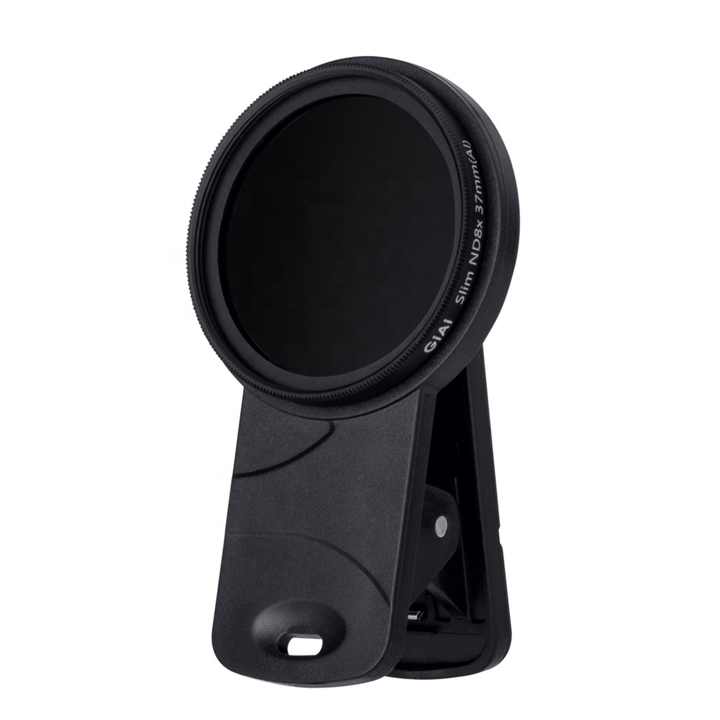
With a typical phone aperture around f/1.5–f/1.8, 1/50 shutter in full sun would massively overexpose even at the lowest ISO. You need to remove about six stops of light or more. A clip-on ND does exactly that. The GiAi 37mm phone ND filter with clamp mounts over the main camera, and a multi-filter kit like the Freewell Mega 14-pack filter kit gives you a range of filters to match changing light (check its listing for the included filters and which devices it fits). As a rough guide, bright sun needs very strong ND, overcast days need moderate ND, and shade needs only a little.
Flicker under artificial light
Indoor lights powered by mains electricity pulse at twice the grid frequency: 100 times per second in 50 Hz countries (UK, Europe, Australia) and 120 times per second in 60 Hz countries (US, Canada). If your shutter doesn’t match, you may see flicker or rolling bands.
- In 60 Hz regions, 1/60 or 1/120 shutter usually avoids flicker. That pairs well with 30 or 60 fps.
- In 50 Hz regions, 1/50 or 1/100 works best, pairing well with 25 fps.
- Shooting 24 fps at 1/50 in a 60 Hz country under cheap LEDs can flicker. Try 1/60 instead; the motion difference is negligible.
When to break the rule
- Slow motion: when shooting 120 fps for slow-mo playback, use around 1/240 for natural blur in slow motion, or faster for crisp detail.
- Action and sports: a faster shutter gives crisp freeze-frames for thumbnails and dramatic, gritty motion.
- Low light: sometimes slowing to 1/30 at 30 fps is better than a noisy high-ISO image, as long as motion is minimal.
- Stylized effects: very slow shutters create dreamy smears for music videos.
- Stabilization artifacts: heavy electronic stabilization with motion blur can sometimes produce a “shimmer” in blurred areas. If you see it, try a slightly faster shutter or a gimbal.
For a broader cinematic workflow including color, framing and movement, read our guide to a cinematic look on your phone.
Quick checklist
- Pick frame rate first, then shutter = 1 / (2 × fps)
- Use a pro video mode or app with manual shutter
- Lowest ISO that gives good exposure
- ND filter on for daylight
- Match shutter to mains frequency indoors to avoid flicker
- Lock white balance, focus and exposure
- Break the rule on purpose, not by accident
FAQ
Can the default iPhone camera follow the 180-degree rule?
Not directly, since it doesn’t expose manual shutter for video. An ND filter nudges the automatic shutter slower, but a pro app gives you precise control.
Does the 180-degree rule matter for TikTok and Reels?
It matters whenever you want smooth, cinematic motion. Fast-cut talking-head content shows less difference than B-roll with movement.
What shutter speed for 60 fps?
About 1/120, or 1/125 if that’s the closest available setting.
Is shutter angle the same as shutter speed?
They describe the same exposure differently. 180° angle always equals half the frame interval, whatever the frame rate.
Smooth, filmic motion starts with less light.
Add the 37mm clamp ND or a full filter kit to hit 1/50 in daylight, and save on a complete setup with the Mix & Match – any 3 for $129 bundle. Every item in the shop ships free worldwide.